

How to Build an AI App: A Step-By-Step Guide for 2026
Learn how to build your first AI app with this beginner-friendly step-by-step guide. Start your journey into AI development today!

Building an AI application is a complex process that refers to architecting a system that learns, reasons, and adapts. In practice, this means designing around data, selecting the appropriate AI model, utilizing retrieval-augmented generation, continually improving performance, and ensuring the software development solution integrates seamlessly with a real-world product.
Many companies struggle to make this a reality. Challenges often include gathering high-quality data, designing scalable architectures, and maintaining model reliability over time. That’s why teams often choose to software outsourcing partner with AI-focused product builders like Empat to reduce risk, validate concepts in a structured way, and bring AI-powered features to market faster.
Why build an AI app in 2026?
Market growth
AI has already become an integral part of successful business development. Global adoption of generative AI and other advanced models continues to accelerate. For example, the artificial intelligence market size has reached 244 billion U.S. dollars in 2025.
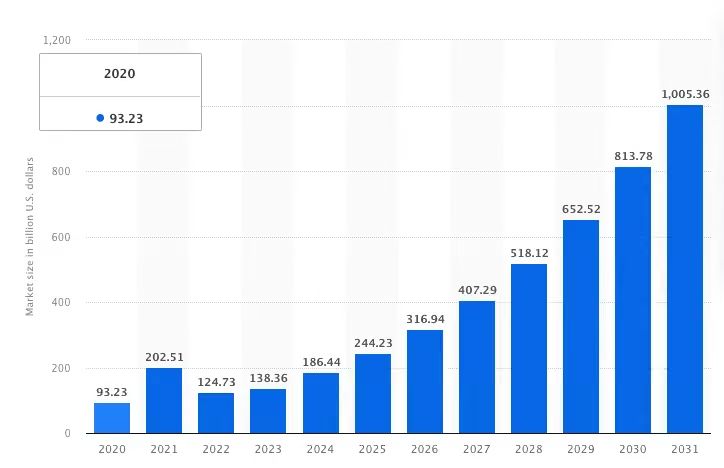
According to recent trends, more companies are embedding AI into their products to remain competitive. Investing in AI-powered app development now is a strategic move to capture this momentum.
AI-powered apps benefits for business owners
- Automation: AI helps streamline repetitive or complex tasks, reduce manual work, and free up human resources for higher-value activities.
- Personalization: With AI-powered apps, you can tailor user experiences in real time — recommending content, customizing workflows, or guiding decisions based on user behavior.
- New Revenue Streams: AI capabilities open doors to entirely new business models — think predictive services, intelligent assistants, or data-driven insights.
Where AI applications are trending
AI apps are proliferating across industries:
- In fintech, AI helps with fraud detection, credit scoring, and personalization.
- In healthcare, it’s used for symptom checking, triage, and patient monitoring.
- In enterprise, AI automates workflows, assists in decision-making, and augments analytics.
- In consumer, chat assistants, recommendation engines, and content generation are all increasingly common.
Given these trends, building an AI app today means positioning your business for the next wave of innovation and growth.
How to build an AI app: step-by-step
If you want to build an AI app that actually improves business outcomes — not just adds a shiny “AI-powered” label — you need a process grounded in strategy, data, and real user needs. Below is a full journey from idea and hiring developers for your startup to production, based on how successful companies and experienced AI partners do it in practice.
Step 1: Define the problem & success metrics
The first step before touching code you need to have absolute clarity on the problem your future AI app is meant to solve. This stage sounds simple, but it’s where most AI projects either gain a strong foundation or quietly fail later.
Problem framing: Start with one question: What exactly should the AI improve or automate?
It can be reducing support workload, predicting demand, personalizing content, preventing fraud, or any other task that benefits from machine learning, particularly those that require the system to process information. The clearer the problem definition, the easier it will be later to choose the right data, model type, and architecture.
Jobs-to-be-Done: Your AI app will only succeed if it genuinely helps the people who use it.
Before the development process, map out:
- who interacts with the app
- in what context
- what they're currently struggling with
- what “ideal help” looks like for them
This is where tools like interviews, job stories, and customer journey mapping shine. Many missteps in AI development come from building something “smart” that doesn’t actually solve a human problem and lacks critical functionality.
KPIs & success metrics: Once you know the problem and the users, define how you’ll measure success.
Typical metrics include:
- accuracy or precision of predictions
- reduction in manual work
- speed of response
- user adoption and engagement
- cost savings
- conversion or retention improvements
Please, don't consider it to be a bureaucracy. Without measurable targets, you can’t evaluate whether your AI app works or needs retraining.
At Empat, we run structured discovery workshops that help validate your business goals, assess technical and training data feasibility, and make sure you’re solving the right problem long before the first line of code is written.
Step 2: Assess readiness
Once you know what you're building, the next question is: Can you build it right now? AI app development doesn’t start with AI models, it starts with a realistic assessment of your resources.
Data audit: First of all, ask yourself the following questions concerning your business:
- Do we have the data needed to train a reliable model?
- Is it structured? Consistent? Clean?
- Do we need historical data, and if so, how much?
- Does the stored data contain the patterns the AI should learn?
This step often reveals that you either already have enough data to start or that collecting unstructured data should be your first milestone.
Infrastructure & skills: AI models require natural language processing, power, storage, and the ability to handle large workloads. You should consider:
- cloud platforms like Google Cloud or AWS
- databases for storing training datasets
- pipelines for preprocessing and serving data
- a team that can work with ML frameworks, APIs, and deployment tools
Buy vs build vs partner:
When you reach the decision point of buy vs build vs partner, the choice shapes everything that comes next. Some companies prefer to build in-house — a realistic path only if you already have experienced backend software engineers and the bandwidth to support them. Others start with third-party AI APIs, which is often the fastest way to launch early-stage features or validate ideas without committing to a large engineering team.
For businesses exploring external talent, marketplaces like Toptal, Upwork, or Fiverr often come up first. But these platforms vary significantly in quality, reliability, and project outcomes. If you're comparing options, it’s worth looking at deeper breakdowns such as Toptal competitors, Upwork competitors, or Fiverr alternatives to understand where freelance platforms work—and where they fall short for AI-driven products.
That’s where partnering with an AI-focused product team like Empat to outsource web development becomes the strongest route. Instead of juggling freelancers, you get an integrated team that can help you hire mobile app developers, build complex backend systems, and deliver full AI engineering from day one. This approach reduces risk, shortens time-to-market, and ensures your AI features are grounded in real technical and product expertise rather than piecemeal talent.
Step 3: Collect, label & prepare data
At this stage, everything starts with understanding where your data will come from — whether it’s user behavior logs, internal databases, third-party APIs, or sensor-generated inputs. Once the sources are clear, the real work begins: cleaning the data, removing errors, handling gaps, unifying formats, and preparing reliable labels for supervised learning and unsupervised learning. This part is usually more time-consuming than people expect, but it’s also where the foundation of your AI product is formed. High-quality, consistently labeled data almost always outperforms sheer volume; even the most advanced model will struggle if the input is noisy, inconsistent, or biased. Focusing on quality at this step saves significant development time later and leads to a far more accurate, stable AI app.
Step 4: Choose the right AI tech stack & architecture
Now comes the technical backbone — choosing the architecture that will support your AI app.
Types of models
The model you choose depends on the problem:
- LLMs for content generation, summarization, and chat assistants
- NLP models for classification, intent detection, and sentiment analysis
- Computer vision models for image recognition, quality control, and scanning
- Predictive ML models for forecasting, scoring, or anomaly detection
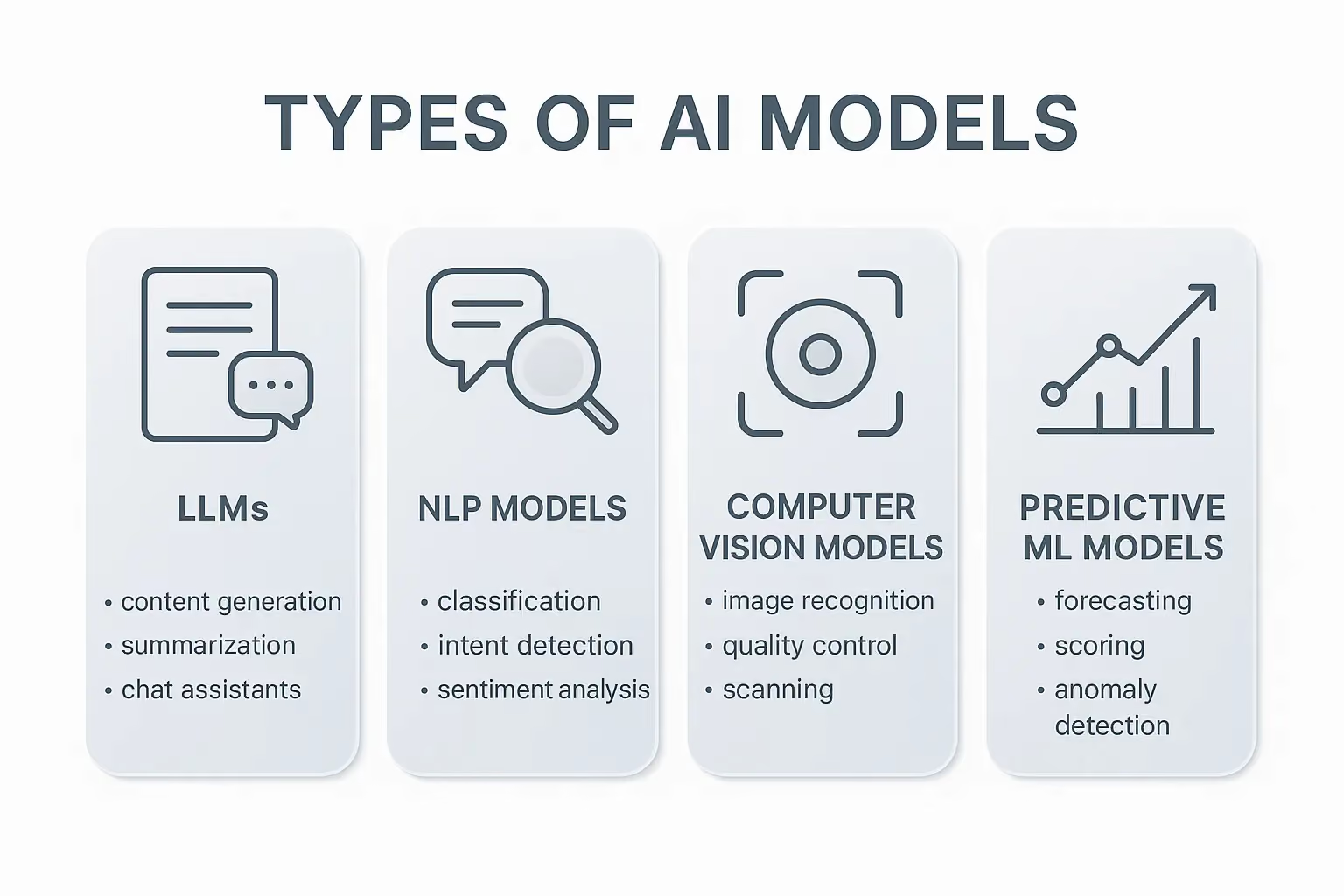
Each type requires different data formats and training processes.
Custom vs pretrained
Here’s the rule of thumb:
- Use pretrained models or APIs when you need faster development or standard features.
- Build custom or fine-tuned models when your data, domain, or specialized tasks are unique (fintech, healthcare, enterprise automation).
Architecture decisions
Key choices include:
- cloud-based inference vs on-device inference
- monolithic backend vs microservices
- serverless APIs vs containerized deployment
- batch processing vs real-time streaming
These decisions affect performance, cost, scalability, and user experience. Empat helps teams choose the right architecture — especially in sensitive industries where compliance and reliability are critical.
Step 5: Train, fine-tune, or configure the model
Training your AI model is the moment when your data pipeline, architecture decisions, and success metrics come together. The training loop is iterative by design. You load and preprocess data, train the model, evaluate it on validation sets, adjust hyperparameters, retrain, and keep repeating this cycle until the model reaches the performance targets you defined earlier.
Throughout this process, you monitor evaluation metrics that show whether the model is using reinforcement learning and understand complex patterns. Depending on the use case, these may include:
- accuracy, precision, or recall
- F1-score
- ROC-AUC
- perplexity for text-generation models
- latency and cost per inference in production
These indicators help you understand not just how the model performs in a controlled environment, but how well it will behave once real users interact with it.
There’s also the practical side: training and fine-tuning require GPU or TPU compute, adequate storage, experiment tracking and analytics tools, and potentially costly cloud resources. Your job is to balance model quality, response speed, and the operational cost of serving predictions at scale — finding the point where performance meets business reality.
Step 6: Integrate the AI model with your mobile or web app
This is the moment your AI model turns from an isolated experiment into a real, user-facing product. To integrate AI into a mobile or web app, your engineering team builds backend APIs that take user input, pass it to the model for inference, and return the results to the interface. On the front end, mobile or web developers weave these outputs into the UI so they feel like a natural part of the experience — not a technical add-on. Smooth, consistent UX is essential for any AI-powered app, especially when users rely on it for fast answers or automated decisions.
Latency becomes a major factor at this stage. You can run inference in the cloud, which gives you more power and flexibility but may cause slight delays, or run it directly on the device for near-instant responses. On-device models work well for privacy-sensitive, low-latency use cases — common in fintech or healthtech — but they’re constrained by hardware. Choosing the right approach depends on your product goals, the complexity of the model, and how quickly users expect results.
Finally, you need production-ready architecture. That means stable APIs, predictable performance, and the ability to handle real user traffic without breaking. At Empat, we specialize in building robust mobile and web applications designed to work seamlessly with AI models at scale — ensuring the transition from prototype to fully operational AI app is smooth, reliable, and built for growth.
Step 7: Test, validate & QA
Testing an AI app goes beyond the usual QA routine. You’re reviewing not only how the product works, but also how the AI model behaves in real-world conditions. That dual nature makes the process deeper and more nuanced than standard mobile or web app testing.
You still start with unit tests, checking that data preprocessing works as expected, API responses are correct, and individual components behave reliably. This is the foundation that keeps the system stable.
Then comes stress testing — pushing the AI app to its limits to see what happens under pressure. You simulate scenarios like:
- a sudden surge of 10× the usual traffic
- rapid spikes in concurrent requests
- long-running sessions that mimic real user behavior
This helps you understand whether the model and infrastructure can keep up when usage grows.
Next is model validation, where you examine how well the AI generalizes. You test it on new data, unfamiliar edge cases, and rare patterns it hasn’t seen before. This is also the point where you check for overfitting and uncover hidden biases that could affect predictions or user experience.
Finally, end-to-end QA ties everything together. You run the entire product flow using real devices, real inputs, and real-world scenarios. The goal is simple: make sure your AI-powered app behaves predictably and consistently outside the controlled environment of development.
Step 8: Deploy, monitor & maintain
An AI app isn’t something you “launch and forget.” Once it goes live, the real work begins — because models evolve, user behavior shifts, and performance needs constant oversight.
A solid deployment pipeline (CI/CD) ensures every update is safe and predictable. It gives your team automated tests before release, smooth deployments, and quick rollback options when something unexpected happens.
Once the app is in production, observability becomes essential. You monitor everything that affects user experience and model performance, including:
- error rates
- inference time
- cost per request
- API uptime
- unusual behavior or traffic patterns
This level of visibility helps you catch issues before they turn into outages or bad predictions.
Model drift monitoring is another core part of maintaining an AI-powered product. As markets, users, or data sources change, your model may start delivering weaker or outdated predictions. Drift alerts let you know when accuracy begins to slip so your team can retrain the model before users notice.
From there, continuous learning keeps your AI app competitive. You collect new data, expand or re-label datasets, retrain models, push updated APIs, and refine the user experience based on feedback. This cycle never really stops — and it’s what separates AI apps that plateau from those that keep improving over time.
Step 9: Ethics, compliance & security of artificial intelligence
Creating apps, especially AI apps, comes with real responsibility. The situation gets even more serious when your product touches regulated industries or collects sensitive user data, especially when compared to other platforms. Ethical AI development, compliance, and security aren’t “nice to have” when you hire remote developers; they’re the backbone of a trustworthy AI product.
Data protection is the first layer. Your app must comply with laws such as:
- GDPR
- HIPAA for healthcare products
- PCI DSS for financial applications
- regional and local data protection regulations
Compliance only works when security is built into every layer of the system — from databases to APIs to model-serving infrastructure.
Another critical step is checking for bias and fairness. Your model should behave consistently across:
- different demographic groups
- languages
- geographic regions
- various usage patterns
Unchecked bias can harm users, damage your brand, or even lead to regulatory consequences.
Security also requires constant attention. You must protect:
- data at rest
- data in transit
- model endpoints
- access controls
- API keys, tokens, and other credentials
Any weakness in these areas puts both your business and your users at risk.
Finally, trust is essential for long-term adoption. People should clearly understand:
- what the AI does
- how decisions or recommendations are generated
- when a human steps in or reviews the result
Transparency helps users feel in control — not controlled by the system.
At Empat, we’ve delivered AI-powered apps from scratch across tightly regulated industries like healthcare and fintech, ensuring not only full compliance but also the user confidence that every successful AI product depends on.
AI app architecture & tech stack
Building an AI-powered application typically involves several layers working together — from the user interface to the model infrastructure and monitoring systems. Each layer has a specific role in ensuring speed, accuracy, and reliability.
Client Layer
- Mobile (iOS/Android) or Web frontend.
This is where users interact with your AI product. The goal is to deliver a fast, intuitive UI that can send requests to the backend and display model outputs in a clear way. Frameworks like React, Vue, Swift, or Kotlin are common here.
Backend/API Layer
- REST or gRPC API serving inference; microservices or serverless components.
This layer acts as the “brain-to-app translator.” It receives user requests, processes them, calls the model, and returns results. The backend may run as microservices for scalability or serverless functions for cost efficiency.
Model Layer
- Hosts the AI model — could be a pretrained LLM, a custom neural net, or a vision model — on Google Cloud or another platform.
This is where inference happens. Your model might run on GPUs, specialized ML runtimes, or external APIs, depending on performance requirements and data sensitivity.
Data Layer
- Databases or data lakes for storing input data, training data, and processed data.
The data layer keeps everything organized: user inputs, historical logs, model training datasets, and processed outputs. It’s the foundation for retraining, analytics, and continuous improvement.
Monitoring & Logging
- Tools for observability, model metrics, and user analytics.
This includes tracking the health of API endpoints, inference speed, model accuracy, error spikes, and user behavior. It ensures the system stays reliable — and helps identify when the model needs retraining.
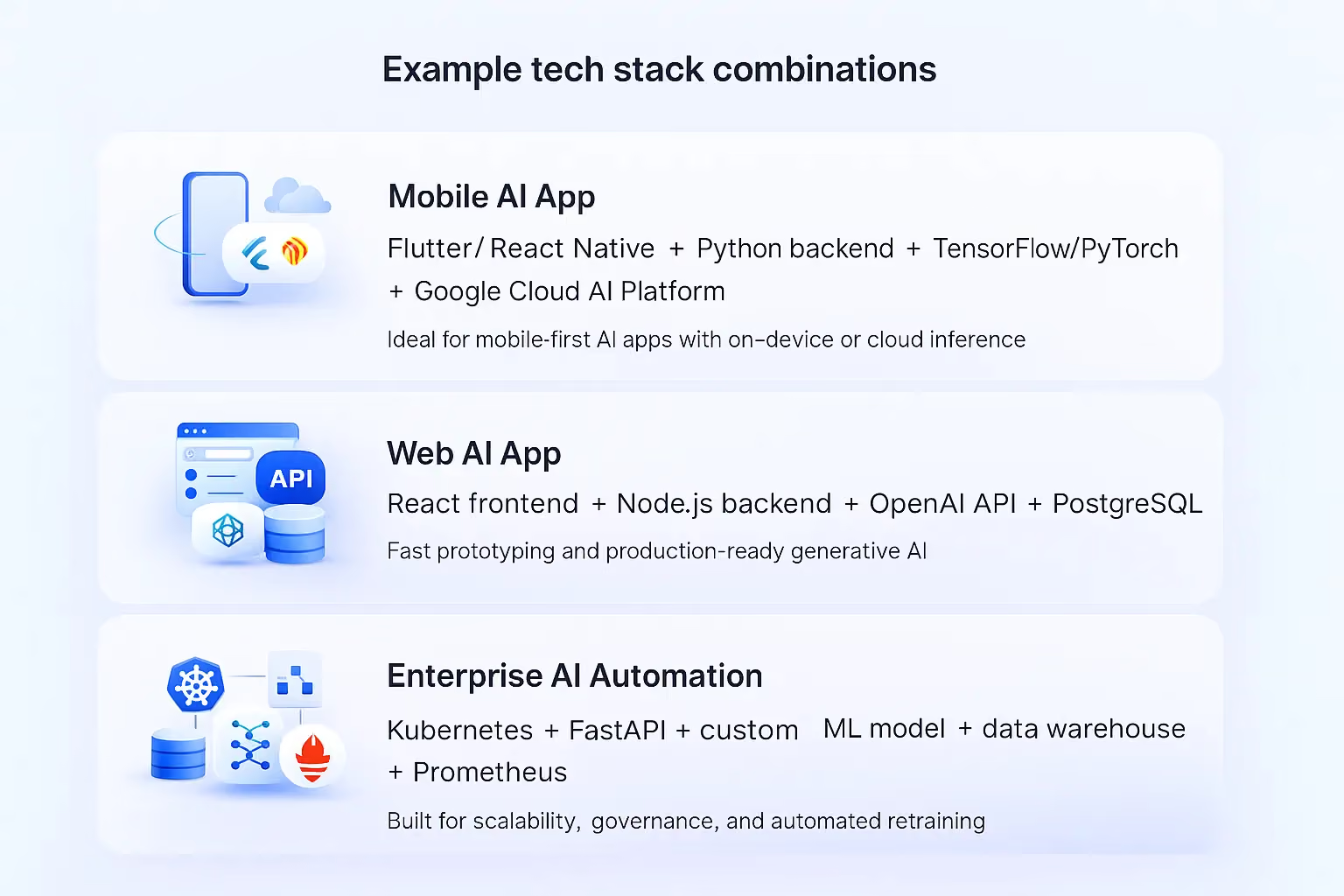
Example tech stack combinations
Mobile AI app
- Flutter or React Native frontend + Python backend + TensorFlow / PyTorch model + Google Cloud AI Platform
Ideal for mobile-first products with on-device features or cloud inference. Python simplifies model integration, while Google Cloud handles scaling.
Web AI app
- React frontend + Node.js backend + OpenAI API (for generative AI) + PostgreSQL for data storage
A clean setup for fast prototyping and productionizing generative AI features without managing your own models.
Enterprise AI automation
- Microservices on Kubernetes + FastAPI + custom ML model + data warehouse + monitoring with Prometheus + retraining pipelines
Best for large organizations that need high availability, strict governance, and automated workflows for continuous model updates.
How much does it cost to build an AI app?
Key cost drivers
- Model Complexity: Simple predictive models are cheaper; fine-tuning LLMs or training vision models costs more.
- Data Pipeline: Cleaning, labeling, and preparing data take significant time and effort.
- Integration Effort: Mobile/web integration, API setup, and latency optimization add cost.
- Ongoing Monitoring: Setting up monitoring, retraining pipelines, and maintaining infrastructure has recurring cost.
Estimated ranges
Here’s a rough breakdown of cost tiers for building an AI app (these are illustrative):
Tier
Estimated Cost Range
MVP
For a minimal viable AI app (e.g., simple predictions, basic UI) — $50K–$150K
Mid-Complexity
More advanced features, fine-tuning, real-time inference — $150K–$500K
Enterprise
Large-scale, high-performance models with compliance requirements — $500K+
Pricing models
- Fixed Price: Good when the scope is well defined, often used for MVPs.
- Time & Materials (T&M): Flexible, useful when the scope may evolve (common in AI projects).
- Dedicated Team: Ongoing partnership with a team (e.g., Empat) — ideal for scale, maintenance, and continuous learning.
Empat’s discovery phase helps you define the scope, select the right model, and decide on the most appropriate pricing model — reducing the risk of cost overruns.
AI use case examples
Here are some real-world AI apps and how they can benefit from AI development:
- Fintech: Fraud detection, personalization of banking experience, risk scoring. Empat’s fintech expertise makes them well-suited for building these systems.
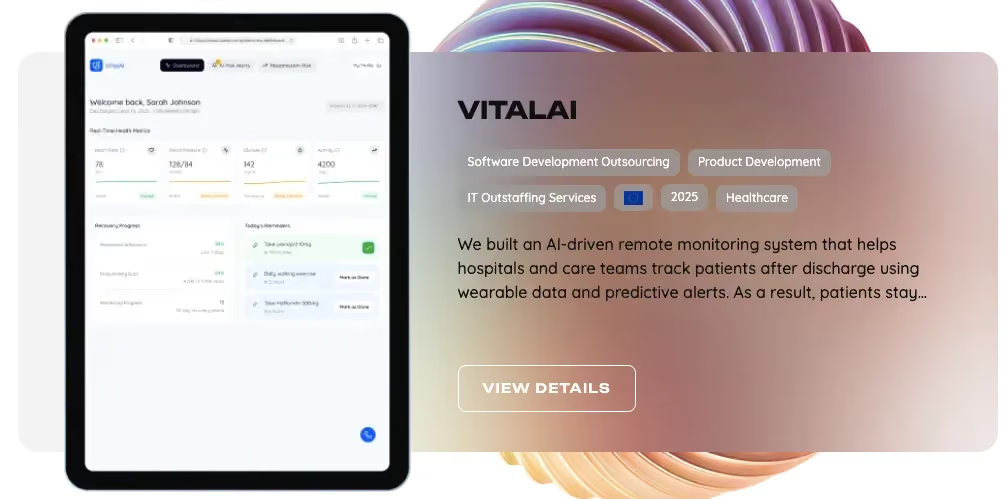
- Healthtech: Patient triage, predictive alerts, post-discharge remote monitoring. Empat worked on VitalAI — a system for hospitals to monitor patients using wearable data.
- Consumer AI: Chat-based assistants, recommendation engines, generative content.
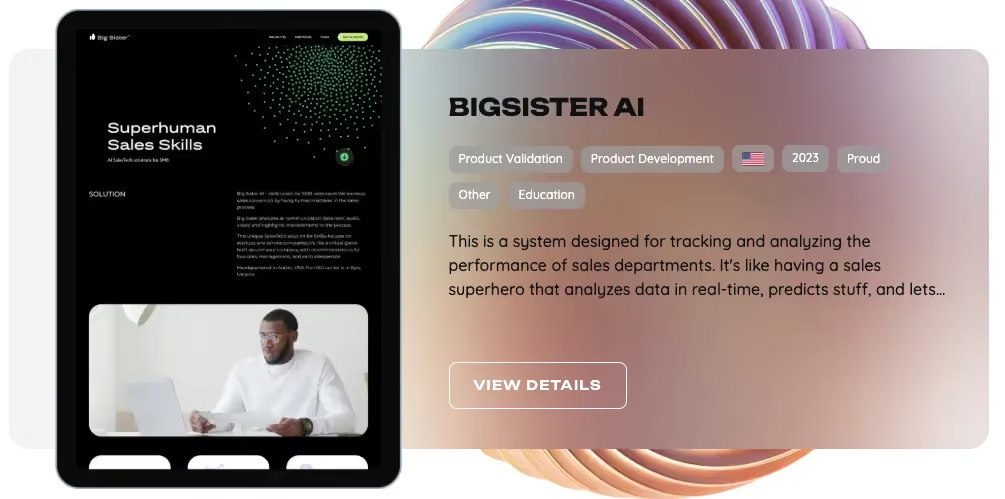
- Enterprise automation: Workflow automation, document processing, smart analytics, and accounting software. For example, Empat developed the BigSister AI product for tracking and analyzing the performance of sales departments.
Because Empat has strong domain knowledge in fintech, education, and healthcare, they can deliver AI-powered features tailored precisely to those industries, ensuring both technical quality and regulatory compliance.
Why work with an AI app development partner like Empat
Here are the key advantages of choosing Empat for your AI app development:
- Research-first approach: At Empat, we start each project with discovery, user research, and validation. When you hire AI developers from Empat, you get a team that helps you shape the product from day one. We dig into the business case, the user journey, the data reality, and the technical constraints to ensure the AI you build is actually effective.
- AI + mobile expertise: We combine deep AI capabilities with strong mobile and web engineering, providing a seamless integration of models into production apps.
- Domain expertise: With real-world AI use in fintech and healthtech, Empat's team understands the need for performance, privacy, and compliance.
- Full-cycle development: Full-cycle development: from early discovery and product strategy → to web design, architecture planning, and full-stack development → to model training and fine-tuning → to seamless integration with your mobile or web app → to deployment, monitoring, and long-term support. Empat stays involved at every stage to ensure your AI product isn’t just launched, but continuously improved and delivering real value.
- Distributed, experienced team: The global presence and senior talent make the company a great fit for startups software development, VCs, non-tech founders, and experienced founders alike.
- Proven track record: Over 300 projects delivered across multiple markets.
Want to build an AI-powered app? Talk to Empat Tech.
FAQ
What is an AI app and how does it work?
An AI app is a software application that uses artificial intelligence — such as machine learning or generative AI — to perform complex tasks that would normally require human-like intelligence. It works by ingesting input data, processing it through trained AI models, and producing output (predictions, recommendations, generated content, etc.).
How do I build an AI app step by step?
You define the problem, assess your readiness (data, skills), collect and prepare data, choose your tech stack, train or fine-tune a model, integrate it into your app, test thoroughly, deploy it, and maintain it while monitoring for drift and compliance.
How much does it cost to build an AI app?
It depends on complexity. An MVP with basic features can cost ~$50K–$150K. More complex, fine-tuned, high-performance AI apps can go from $150K to $500K+, and enterprise-level solutions may cost more. The pricing model (fixed price, T&M, dedicated team) also matters.
How long does AI app development take?
Development timelines vary. A lean MVP might take 3–6 months. More complex AI apps, especially those requiring custom model training, infrastructure, or regulatory compliance, can take 6–12+ months. Continuous learning and model retraining continue beyond initial release.


