

What Is AI App Development and How Does It Work?
Learn how AI app development works, explore AI features, costs, tech stacks, and the benefits of working with custom mobile app developers with AI expertise.

AI adoption is no longer limited to early adopters. According to Stanford’s 2025 AI Index, 78% of organizations reported using AI, up from 55% in the previous year. Generative AI adoption also more than doubled, with 71% of organizations using it in at least one business function. Let’s figure out how you can utilize AI to get the maximum out of your application.
What is AI app development?
AI app development involves building apps with AI features that users can access. The ChatGPT app, for example, was created using AI development to power its functions. (Wow, that's a mouthful.)
You can engage in AI development too if you want, for that, you will have to hire a professional team or build a team of your own. It involves incorporating AI features into your product, like chatting, image creation, and voice recognition. Imagine all the features that have arisen in the apps in the last year or so. All of these features are considered AI development. On the practical side, working with an experienced AI software engineer can help you implement these advanced features efficiently and ensure they function seamlessly within your app.
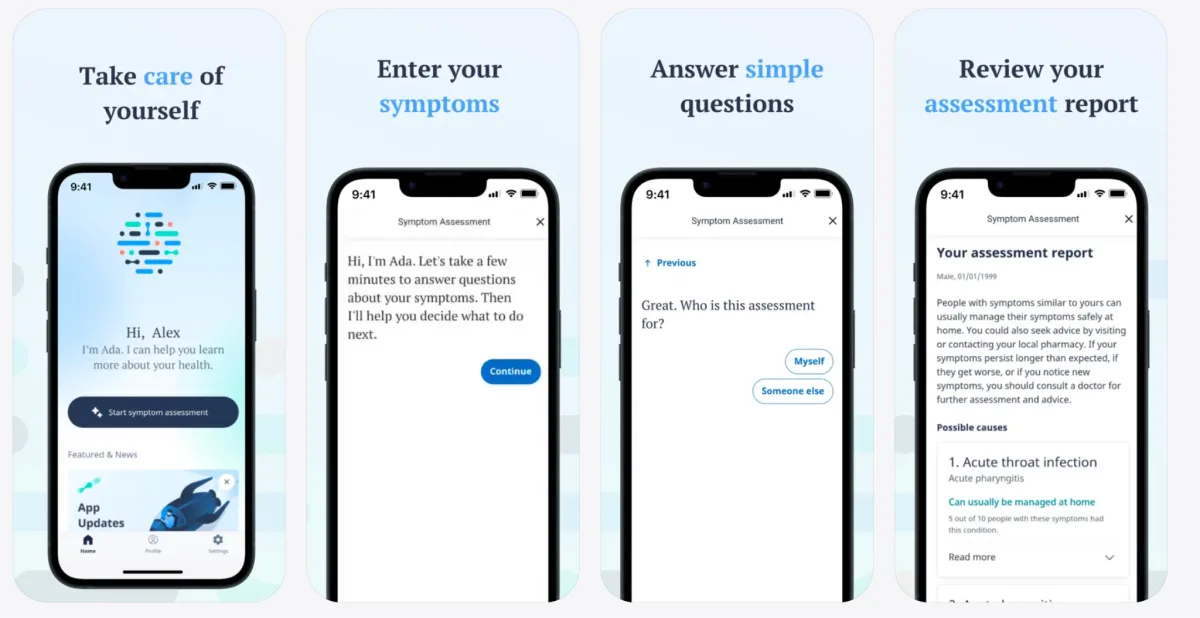
One of the examples is Ada AI Doctor, a personal health companion and telemedicine app that uses conversational AI to help users assess their symptoms and understand possible causes. The app combines AI-powered health insights with clinical knowledge to make health information easier to access and understand.
AI Features That Work in Mobile Apps
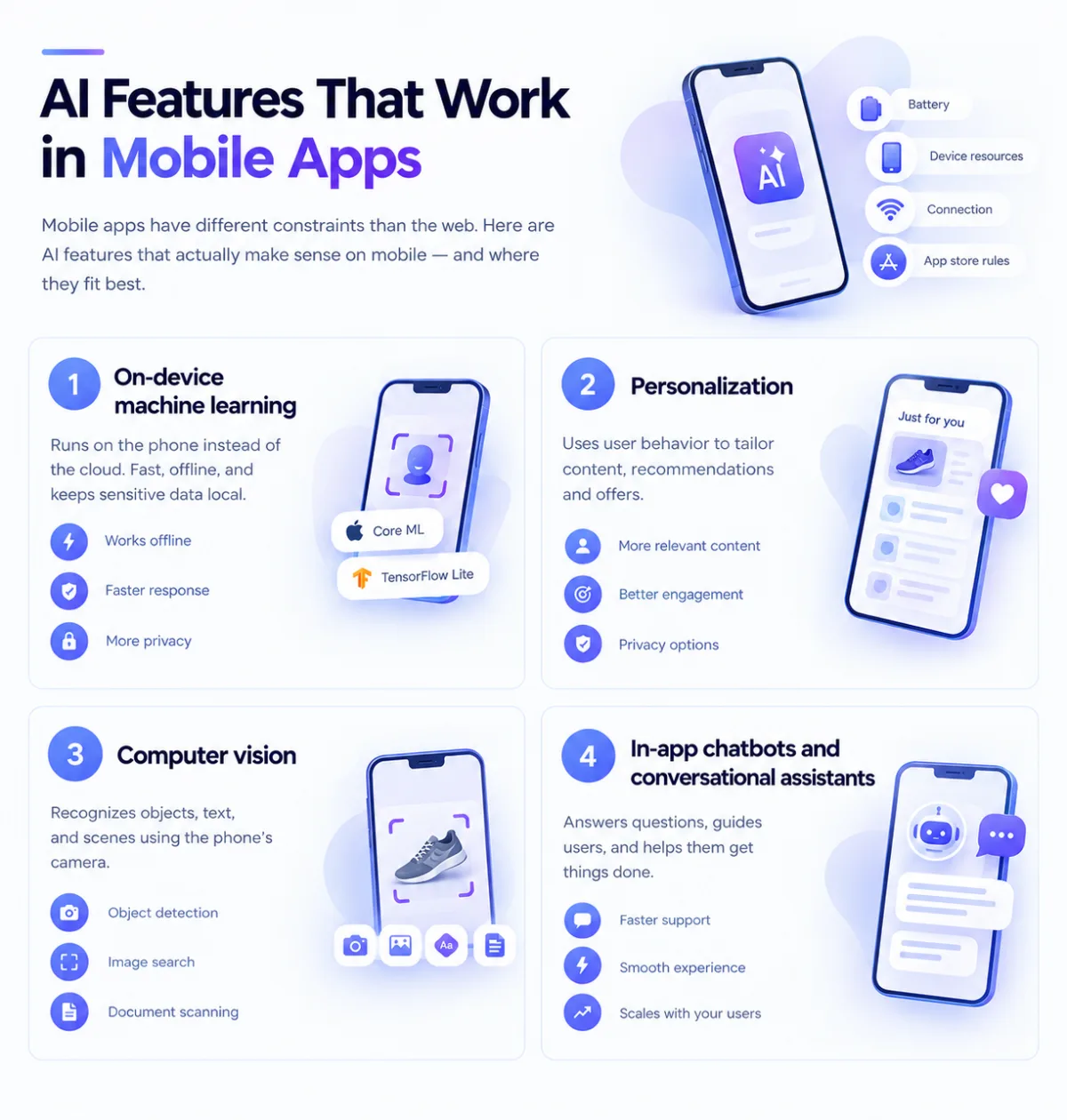
AI in mobile apps comes with constraints you don't face on the web. Battery use, limited device resources, unreliable connections, and app store requirements all affect what makes sense to build. Here are some of the AI features that work well in mobile apps today and where they fit best.
On-device machine learning
Instead of sending every photo, voice clip, or sensor reading to the cloud, on-device machine learning can run directly on the phone. Technologies such as Core ML on iOS and ML Kit or TensorFlow Lite on Android make this possible.
The main benefits are practical: features can work without an internet connection, responses can be faster, and sensitive data can stay on the device. This can be particularly useful for apps that handle health data, location, or other personal information.
The trade-off is that mobile devices have limited processing power and storage. On-device models need to be relatively small and efficient, so this approach works best for focused tasks such as image classification, object detection, speech processing, or face detection rather than large generative AI models.
Personalization
Mobile apps collect useful behavioral signals: what users tap, what they skip, how often they return, and which features they use. This data can power personalized recommendations and experiences.
Personalization can be relatively simple, such as changing the order of content for each user, or more advanced, such as predicting which products, notifications, or offers are most relevant to them.
The key decision is where the personalization logic should run. On-device processing gives you more privacy and can work offline, while server-side models can handle more complex predictions and learn from larger datasets. The latter requires a solid data pipeline and careful attention to privacy.
Computer vision
Mobile cameras make computer vision useful for much more than face recognition. Common applications include object detection, augmented reality, visual search, image classification, and document scanning.
Frameworks such as Core ML and ML Kit make many of these features easier to run directly on a device. But the difficult part is rarely getting a model to recognize something in ideal conditions. Real-world use brings different lighting, camera angles, backgrounds, motion, and image quality. Getting reliable results across those conditions usually requires as much engineering work as choosing the right model.
In-app chatbots and conversational assistants
An AI assistant powered by an LLM API can answer support questions, guide users through onboarding, search product information, or become part of the product itself.
For mobile apps, the challenge is making the experience feel native rather than like a web chatbot inside an app. Responses need to arrive quickly, the app should handle poor connectivity gracefully, and the product needs sensible limits on model usage and API costs.
These considerations become more important as the user base grows. A small difference in the cost or latency of each AI interaction can have a significant impact when thousands or millions of users are using the feature every day.
If you're evaluating whether your product needs a full conversational agent versus a simpler chatbot, our AI Agents Development page breaks down where the line sits.
Key benefits of AI-powered apps
The main benefit of AI features in your application is, of course, the hype. But we should not forget that AI also brings a lot to the table. It may not be Michelin quality, but it's useful for some things. AI automates repetitive tasks, which is very useful for apps like Trello or Jira. If you want to build a web-based AI application but lack an in-house team, consider how outsourcing web development can help you find experienced professionals to handle the project efficiently.
It improves personalization because the user can implement anything inside the app using AI. ChatGPT can become a personal agent that can work instead of you.
AI improves the decision-making process based on analysis because it can notice trends in large data much faster than a human. It can also notice coincidences and correlations in data, which may be useful in predicting consumer behavior. For businesses looking for tailored solutions, investing in custom mobile app development services can ensure the app meets specific needs and integrates AI capabilities effectively.
The business impact is already measurable in some areas. Stanford's 2025 AI Index found that 71% of organizations using AI in marketing and sales reported revenue gains, although the most common increase was below 5%. In software engineering, 41% of organizations using AI reported cost savings.
How to build an AI app: step-by-step guide
AI app development can be similar to cooking dinner, except it’s much harder and requires a whole kitchen of workers just to make one ingredient. Let’s walk through the AI app development process and identify crucial steps.
Define your AI app’s purpose and features
Usually, any development starts with a planning stage. At this point, you should brainstorm what exactly your AI application will and will not do. Identify pain points your app will solve and what AI features you would want implemented. Look into chatbots, recommendation engines, and fraud detection. If your app requires a strong visual identity, learning how to hire a graphic designer can help you create a user-friendly and appealing interface.
Your AI app must have key characteristics to become a reality:
- Singular mission – A clear, focused AI application (e.g., chatbots, image recognition, AI assistants).
- Demand – A real need for AI-driven automation or insights.
- Achievable number of users – Make sure the AI model scales effectively for real-world use.
You can either work with a contractor or develop the AI app yourself. If you choose the latter, plan your budget for hiring AI/ML specialists, data scientists, and custom mobile app developers with AI expertise while securing the necessary infrastructure for model training and deployment. If your project requires cross-platform development, learning how to hire React Native developers can help you build a high-quality AI-powered mobile app efficiently.
Choose the right AI model and technology stack
After you identify the features of your app and the mission it will serve, move on to the tech stack part. Based on your vision, look into different technologies for different purposes. Here are some examples:
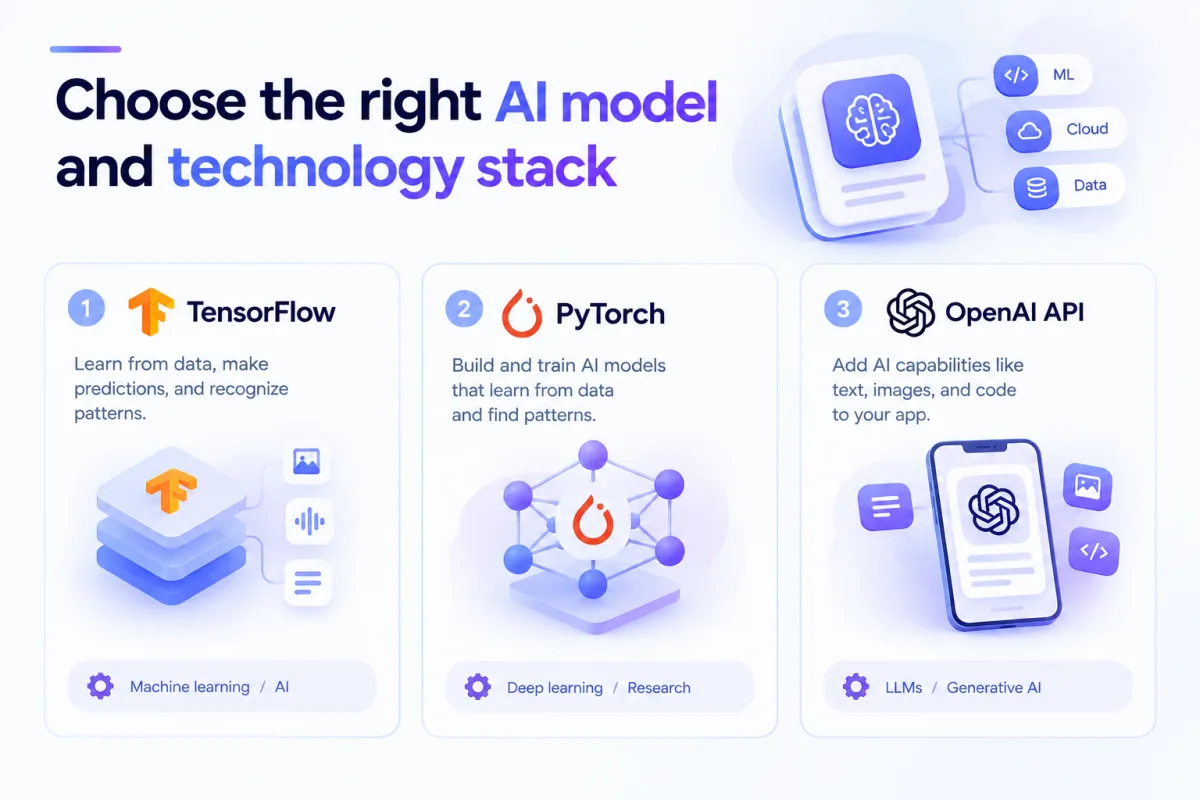
TensorFlow
It's a super-smart assistant that can learn from data and help make predictions, recognize objects in pictures, understand human speech, or even suggest what movie you might like next. TensorFlow is like the toolbox that powers this assistant!
It’s a machine learning and artificial intelligence (AI) library created by Google, and it helps computers learn patterns, make decisions, and improve over time — just like how humans learn from experience. However, if your project requires a scalable and efficient backend for AI integration, you may need to hire Django developers to build a reliable web framework.
PyTorch
Imagine you are teaching a child how to recognize different animals. You show them pictures and correct their mistakes, and over time, they learn to identify them correctly. PyTorch is a powerful tool that helps computers learn in a similar way! If you're building an AI-powered application with both front-end and backend components, knowing how to hire a full-stack developer can help ensure seamless development and integration.
It’s a machine learning and AI library developed by Facebook (Meta) that helps researchers and developers build AI models that can learn from data, recognize patterns, and make smart decisions. If you’re planning to develop an AI-powered app, understanding how to hire mobile app developers can ensure you find the right talent to bring your idea to life.
OpenAI API
This one is the most popular super-smart assistant that can write text, answer questions, create images, and even generate code — all based on a simple request. The OpenAI API is the tool that makes this possible!
It allows developers to connect their apps to powerful AI models (like ChatGPT and DALL·E) so they can generate text, understand language, and create content automatically. If you need help integrating AI into your website, learning how to find a web developer can ensure you hire the right expert for the job.
Collect and train data for AI models
AI can do anything and can be anything. Unfortunately, it's only as good as the data you train it on. AI is a child, and the data is the nutrition that grows it into a complete person. Getting proper data may sound easy, but it's really not. In order to access and gather data through the proper channels, you will need to do the following:
1. Gathering data
- Collect relevant data from sources like databases, APIs, web scraping, or user input.
- Make sure data is diverse to avoid bias and improve AI accuracy.
- Store data securely in structured formats (CSV, JSON, databases, or cloud storage).
2. Cleaning data
- Remove duplicates, missing values, and incorrect entries.
- Normalize data by converting formats and fixing inconsistencies.
- Handle outliers and balance datasets to prevent model bias.
3. Labeling data
- Tag or categorize data (e.g., labeling images as “dog” or “cat”).
- Use manual annotation, AI-assisted labeling, or crowdsourcing (e.g., Amazon Mechanical Turk).
- Verify labeling accuracy with quality control checks.
4. Testing & Refining
- Split data into training, validation, and test sets.
- Continuously improve labeling accuracy with human feedback.
- Monitor AI performance and retrain models with updated, high-quality data.
You may want to ask a contractor for help to skip this labor-costly process and receive ready-to-use data to feed your AI.
Develop and test AI algorithms
AI app development is a multifaceted process that requires training data to refine machine learning models. After feeding an AI-powered app with sufficient data, rigorous testing is a must. AI app developers must conduct bulk testing across thousands of scenarios to simplify workflows and make sure the AI models function accurately in controlled and uncontrolled environments.
Understanding web design vs web development is essential for AI app development, ensuring both an engaging user interface and a solid backend. Machine learning algorithms must be refined based on user interactions and feedback. AI monitoring tools help improve AI capabilities over time improving performance. If your AI app requires backend development with Java, you may need to hire Java developers for seamless integration and scalability.
Integrate AI into the mobile or web application
AI mobile app development uses AI technologies and app platforms to create smart features. Whether you're building an Android app or using a no-code app builder, AI-powered tools like natural language processing, computer vision, and predictive analytics must integrate smoothly. If you need an interactive web interface, hiring React JS developers can ensure a responsive front end.
APIs connect AI tools to the backend, allowing AI-powered apps to process data efficiently. Many AI app development companies use cloud services like Google Cloud for scalability, data privacy, and efficiency. A strong development process includes security measures, data protection, and performance optimization for better user engagement. If you need global talent, learning how to hire remote developers can help you find skilled professionals.
AI mobile app development integrates AI technologies with app platforms to create smart features. Whether for an Android app or a no-code builder, AI-powered tools like natural language processing, computer vision, and predictive analytics must blend seamlessly into development.
For a dynamic web interface, hiring React JS developers ensures a smooth, responsive front end. APIs connect AI tools to the backend, enabling efficient data processing. Many AI app development companies use cloud services like Google Cloud for scalability, data privacy, and efficiency. Strong security measures and optimized performance are key. If expanding your team, knowing how to hire remote custom mobile app developers with AI expertise can help you find skilled talent worldwide.
Deploy and optimize for long-term success
AI adoption does not automatically translate into business value. Deloitte's 2025 research found that 85% of organizations increased their AI investment over the previous 12 months, while only 6% reported achieving payback within one year. Most respondents expected a typical AI use case to reach satisfactory ROI within two to four years.
Once an AI app is live, teams need to track user behavior, monitor model performance, and refine AI systems as new data becomes available. Regular updates are also important for maintaining security, fixing bugs, and keeping the app aligned with changing user expectations. For businesses without enough in-house expertise, IT outstaffing services can help expand the team with specialized AI and development skills.
The same principle applies to the infrastructure behind the app. Cloud-based AI platforms can simplify model deployment, monitoring, and scaling, while ongoing optimization can help control infrastructure and API costs as usage grows. Whether you're building a dating app, a consumer product, or an enterprise solution, treating AI as an ongoing part of product development rather than a one-time feature can make a significant difference to its long-term performance. Businesses looking to build scalable cloud-based products can also consider SaaS development.
No-code vs. custom AI app development
AI app builders like Appy Pie and Builder.ai enable businesses to create apps quickly without coding knowledge. No-code app builders make AI-powered app development easy and accessible. However, they lack advanced features and deep learning capabilities. Custom development offers AI-powered solutions tailored to a business’s unique needs.
By integrating proprietary AI models trained on specific user data, companies can enhance performance and utilize AI for more complex tasks like image recognition and languages. When scalability and personalization matter, a custom-built AI app is often the best AI solution. Many businesses also rely on product development services to streamline the creation process and ensure their AI app meets market demands efficiently.
Top AI tools and platforms for AI app development
The right tools are key to AI-powered app development. Top options include:
- Google Cloud AI – Scalable AI models and real-time data insights.
- IBM Watson – Great for enterprise AI, customer engagement, and natural language processing.
- OpenAI – Ideal for chatbots, AI-driven content, and deep learning.
These platforms help businesses build advanced AI apps while cutting costs and enhancing data security.
AI app development costs and timelines
AI app development costs can vary significantly depending on what you're building. The main factors are the number and complexity of features, the AI approach you choose, the amount of data involved, integrations, security requirements, and whether you use existing AI models or develop custom ones.
As a general benchmark, Clutch's 2026 data shows that AI development projects reviewed on its platform typically range from $10,000 to $49,999, while the average reviewed project costs around $120,595. The typical AI development timeline is about 10 months, although smaller projects can take considerably less time.
A simple app that connects to an existing AI API may cost $10,000–$50,000 and take a few months to develop. A more complex product with custom machine learning models, computer vision, real-time processing, or extensive data pipelines can easily reach $100,000+ and require a longer development cycle.
Before setting a budget, break the project down into its core features and identify which parts actually need AI. This can help avoid unnecessary complexity and give your development team a more realistic estimate. You'll also need to account for ongoing costs such as cloud infrastructure, AI API usage, model monitoring, maintenance, and updates.
If you need to expand your team during development, staff augmentation services can help you add AI engineers, mobile developers, and other specialists without building an entire in-house team.
Want a more specific estimate for your project? Use our AI Development Cost Estimator to estimate your budget based on the features, complexity, and technical requirements of your app.
How Custom Mobile App Development With AI Expertise Works in Practice
At Empat, we combine mobile engineering with AI when it solves a real product problem. Here are two examples from our work that show how this looks in practice.
PixShare: On-device face recognition for photo sharing
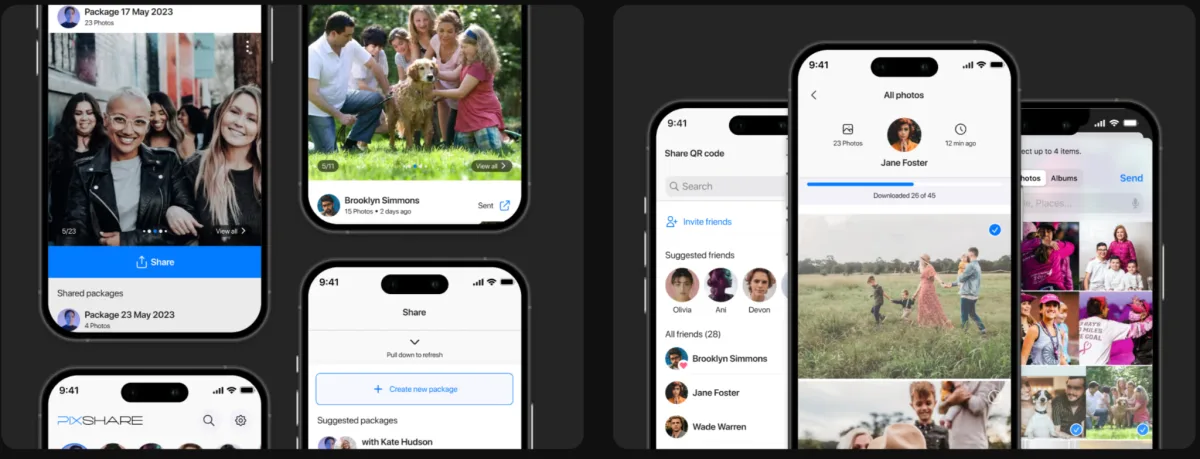
For PixShare, Empat built a mobile app that uses on-device face recognition to identify friends and family in a user's camera roll and automatically share relevant photos with them. The key challenge for our custom mobile app developers with AI expertise was making face recognition fast and reliable across different devices, without sending users' photos to the cloud for processing. PixShare is available on both iOS and Android.
Aurora: Computer vision for virtual try-on
Aurora is an augmented reality jewelry app developed by Empat that lets customers virtually try on pieces using their phone camera before buying. The solution helped the client increase online conversions by 3.9x. Empat is also exploring AI models that can generate 3D product models from 2D photos, which could make adding new products to the virtual catalog faster and less expensive.

Empat has a 5.0 rating on Clutch across 146+ client reviews. Explore our case studies to see more examples of how we apply AI to mobile and other digital products.
Future trends in AI app development
AI innovation is revolutionizing mobile app development. Market trends suggest that generative AI will drive new AI applications, making AI-powered app development more accessible. Virtual assistants, real-time data insights, and AI-driven automation are becoming standard features in modern AI apps. If you're launching a new business, understanding how to outsource software development for startups can help you build a high-quality AI app while managing costs effectively.
Tech giants are pushing AI advancements such as Edge AI, which enhances user-friendly app interfaces by processing AI models directly on devices instead of the cloud. This shift boosts data privacy, cuts latency, and improves user experience. Apps that utilize AI help businesses build apps faster, optimize workflows, and boost customer engagement. Many companies use software development outsourcing to speed up AI app development, cut costs, and access global talent. Staying ahead of AI trends helps businesses streamline AI app development, improve efficiency, and create standout AI applications.
Whether you're a startup with an app idea or an established AI mobile app development company, the key to success lies in continuously improving AI solutions and adapting to emerging AI-powered advancements. If you're launching a new business, learning how to hire developers for a startup can help you build a strong team that brings your AI app vision to life.
Conclusion
AI app development helps businesses build smart, efficient apps that improve user experience, automate tasks, and drive growth. From AI chatbots to predictive analytics, artificial intelligence unlocks new opportunities. While AI integration can be complex, the right tools and expert support make AI-powered apps easier to develop. Working with an AI software development company ensures seamless AI adoption and high-performing applications.
For businesses looking to integrate AI without the headaches of complex development, outsourcing AI projects to expert teams like Empat can be a game-changer. By leveraging industry expertise, companies can reduce costs, avoid technical pitfalls, and accelerate time to market while ensuring their AI-powered apps deliver top-tier performance. The future belongs to businesses that embrace AI early, optimize it continuously, and innovate boldly — so why wait? Contact us, and let's create something magical!
FAQ
What AI features can be added to a mobile app?
AI can add features such as on-device image recognition, personalized recommendations, voice processing, computer vision, predictive analytics, and in-app AI assistants. The right option depends on what your app needs to do, the data available, privacy requirements, and whether the feature needs to work offline.
How is AI mobile app development different from regular app development?
AI adds another layer to mobile development. Along with the usual UX, backend, and device requirements, the team needs to consider AI models, data, inference speed, privacy, and model performance. Some AI features can run directly on the device, while others rely on cloud APIs and infrastructure.
How much does it cost to build an app with AI?
AI app development typically costs around 10,000 USD if it’s a simple proof of concept (PoC) and can go up to 200,000 USD or more for highly complex apps. Exact pricing will depend on the number of app features and the amount of customization needed.
Should AI run on the device or in the cloud?
It depends on the feature. On-device AI can reduce latency, work offline, and keep sensitive data on the phone. Cloud-based AI is better suited to larger or more complex models that need more computing power. Many mobile apps use a combination of both.


